Navigating the world of Ethernet cables for optimal gaming can feel like a labyrinth, especially with new standards constantly emerging. Many dedicated US gamers, balancing demanding jobs and family life, wonder if upgrading to a Cat7 Ethernet cable is truly a necessary step to achieve the ultimate lag-free experience. With gaming being a crucial outlet for relaxation, skill-building, and social connection for an average gamer of 36 who spends over 10 hours a week online, every millisecond counts. This comprehensive guide cuts through the marketing hype and provides clear, actionable insights into whether Cat7 offers a real advantage for your setup or if your money is better spent elsewhere. We'll explore the technical specifications, real-world performance differences, and practical considerations for budget-conscious gamers striving for peak performance without unnecessary upgrades. Discover if Cat7 is the essential link you need or an unnecessary luxury.
Is Cat7 Ethernet Really Necessary for My Gaming PC?
No, for the vast majority of gamers, Cat7 Ethernet is not truly necessary. Modern games require stable, low-latency connections, but not ultra-high bandwidth beyond what Cat6 or even Cat5e cables can already provide. Your internet service provider's speed and your router's capabilities are far more likely to be the limiting factors for your gaming experience.
Why Do Some Gamers Still Recommend Cat7 for Optimal Performance?
Some gamers might recommend Cat7 due to its higher theoretical bandwidth (up to 10 Gbps) and superior shielding, assuming these translate directly to better gaming. However, this often overlooks the practical limitations of home networks and internet speeds. While Cat7 is technically advanced, its benefits for gaming are often marketing hype rather than real-world performance gains, as current gaming doesn't saturate its capabilities.
What's the Best Ethernet Cable Alternative if Cat7 is Overkill for Gaming?
For most gaming setups, a good quality Cat6 or Cat6a Ethernet cable is the best alternative to Cat7. Cat6 handles Gigabit Ethernet (1 Gbps) perfectly, and Cat6a supports 10 Gigabit Ethernet over longer distances, making them ideal for current and near-future residential internet speeds and internal network demands, without the added cost or specialized connectors of Cat7.
Will Upgrading to Cat7 Lower My Ping or Reduce Latency in Games?
Upgrading to Cat7 is highly unlikely to lower your ping or reduce latency in games. Ping and latency are primarily influenced by your internet connection speed, the distance to the game server, and network congestion. A Cat7 cable provides negligible improvement over a working Cat6 cable in terms of signal propagation speed, so other factors are far more critical for a low-latency gaming experience.
How Can I Tell if My Current Ethernet Cable is Bottlenecking My Gaming?
You can tell if your cable is a bottleneck by checking your internet speed with a wired connection. If your speed tests consistently show significantly lower results than your subscribed plan, or if you experience frequent packet loss and disconnects, your cable *might* be faulty. However, an old, well-functioning Cat5e or Cat6 cable is rarely the bottleneck for typical gaming speeds.
What are the Actual Technical Advantages of Cat7 Compared to Cat6 for Gaming?
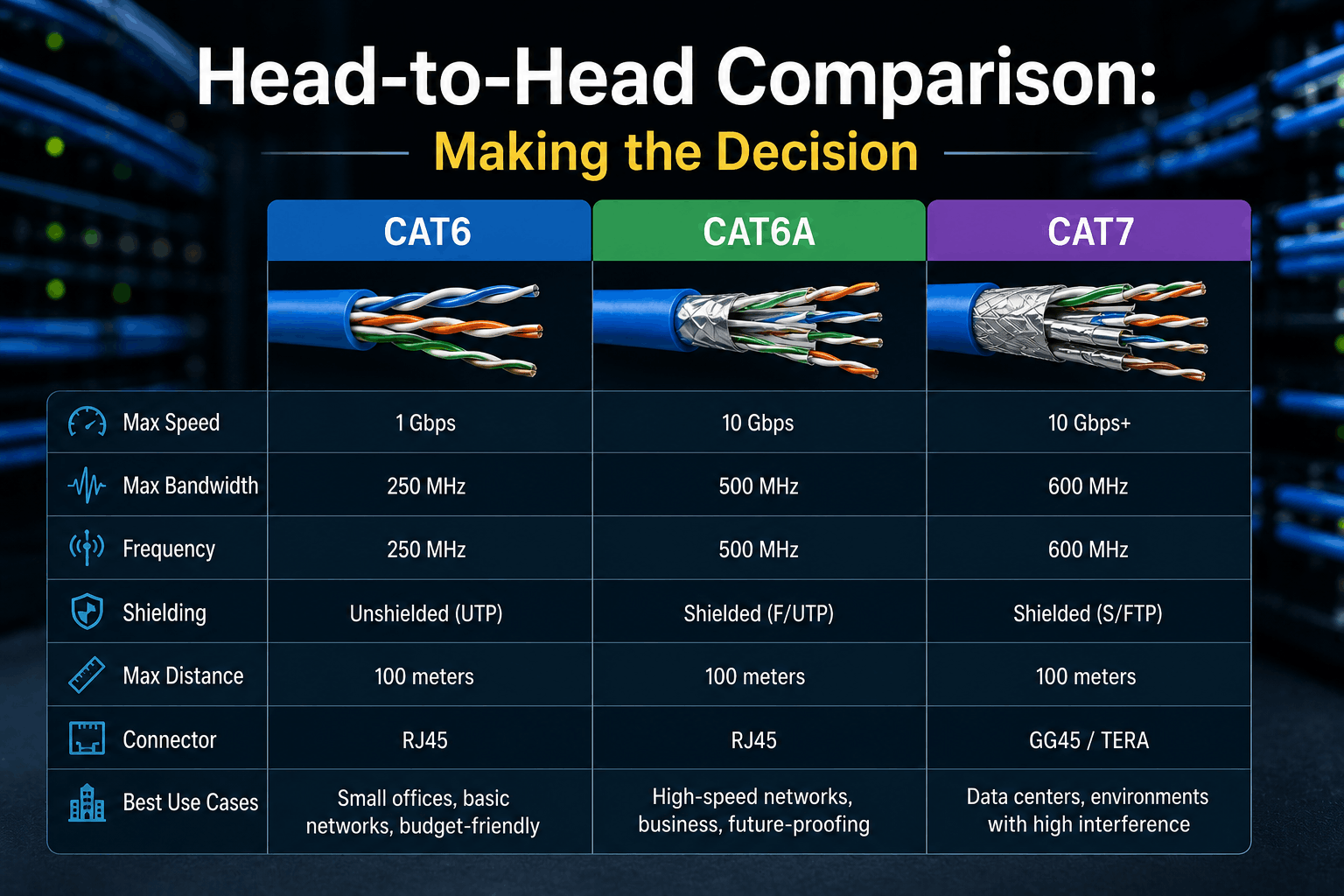
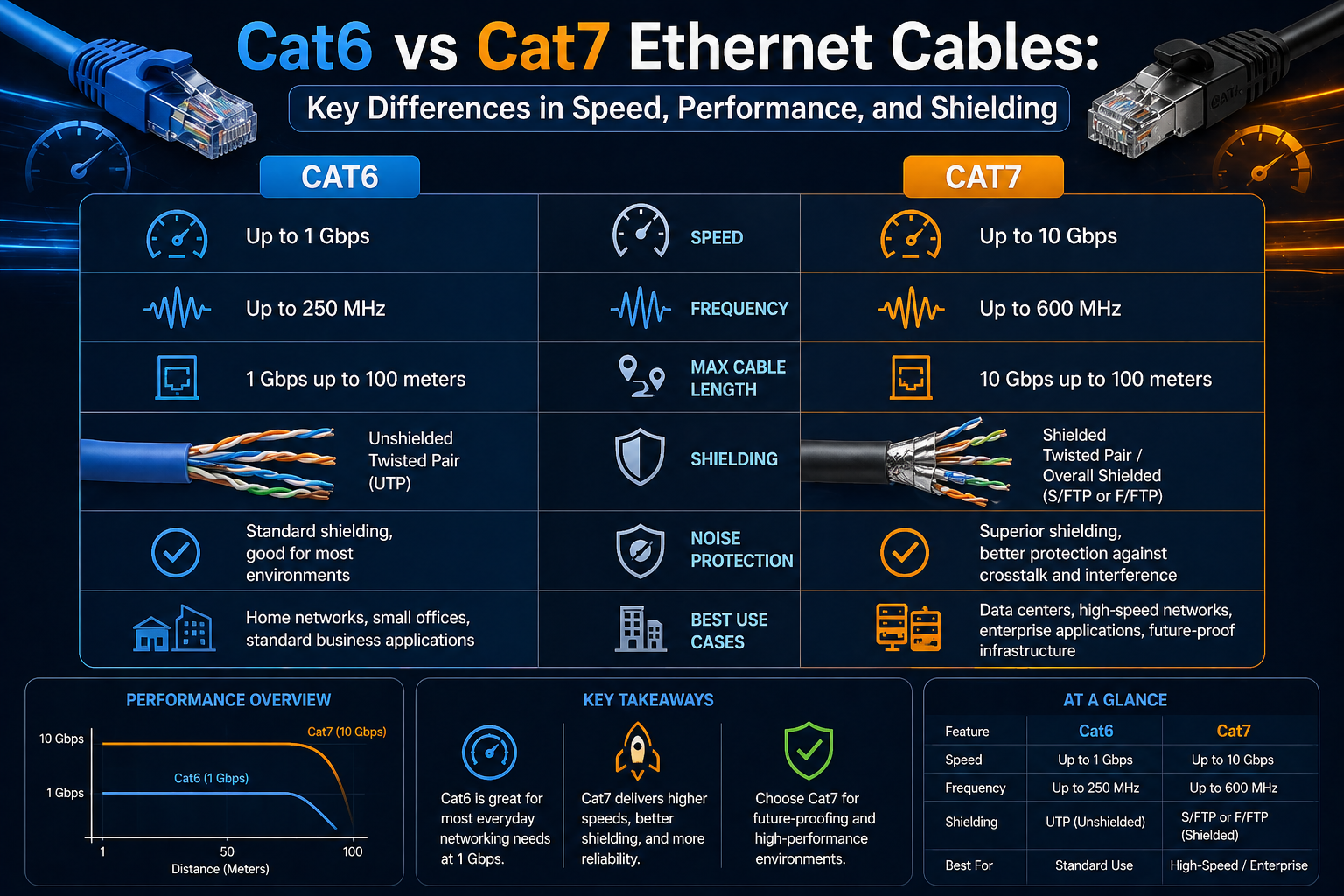
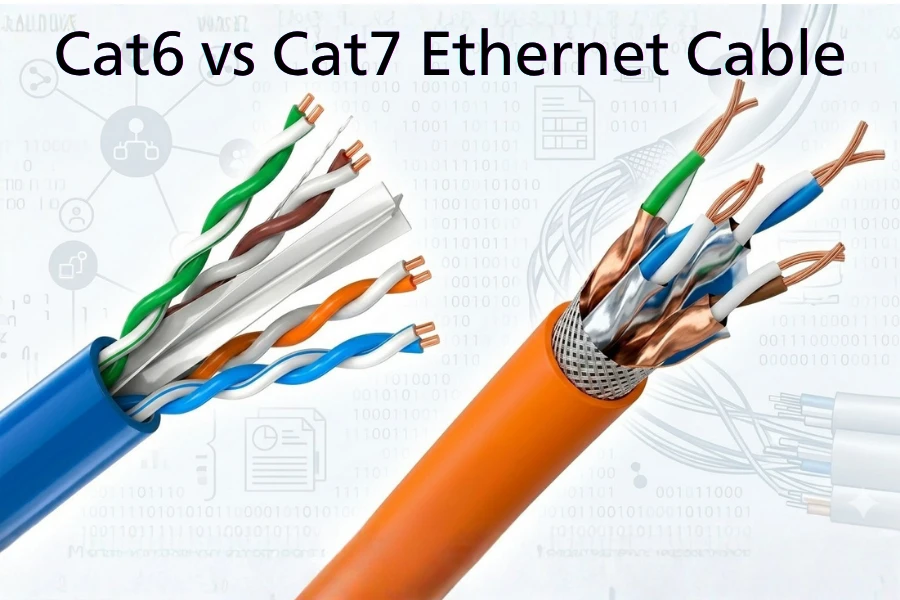
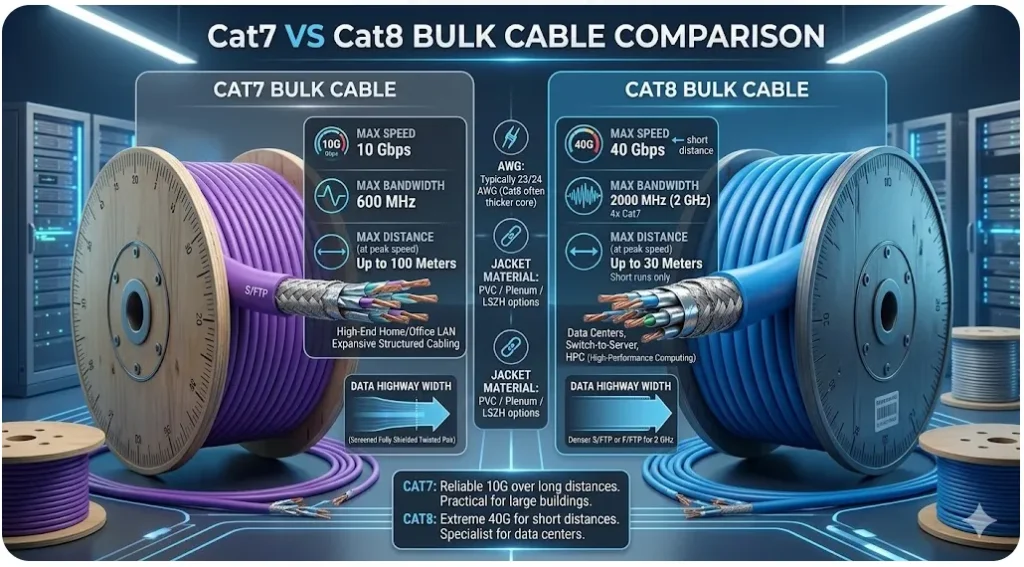
The actual technical advantages of Cat7 over Cat6 include higher theoretical bandwidth (600 MHz vs 250 MHz for Cat6) and superior individual shielding for each wire pair, designed to reduce crosstalk and EMI. While these features are beneficial in high-noise, enterprise-grade data centers, they offer no measurable performance advantage for typical home gaming setups where such extreme interference is absent and bandwidth demands are lower.
Should I Consider Cat7 for Future-Proofing My Gaming Network?
While Cat7 offers impressive future-proofing for theoretical 10 Gigabit Ethernet, it is not a practical choice for most gamers. Cat6a already provides 10 Gbps support over standard distances using common RJ45 connectors, making it a more sensible and cost-effective option for future-proofing your home network than Cat7, which often requires specialized GG45/TERA connectors to fully realize its benefits.
Hey fellow gamers! Ever find yourself staring at a wall of Ethernet cables at the electronics store, wondering if shelling out extra for that fancy Cat7 cable will finally obliterate your ping and give you that competitive edge? You are not alone. With 87% of US gamers regularly diving into virtual worlds, often balancing intense raid schedules with family dinners and work deadlines, every bit of performance optimization matters. We crave that smooth, lag-free experience, whether we are unwinding in a cozy co-op game after a long day or climbing ranked ladders in an intense battle royale. The average gamer, around 36 years old, dedicates over 10 hours a week to their passion, so maximizing those precious gaming moments is key. But is Cat7 truly the secret sauce for flawless online gaming, or is it just another piece of hardware hype that budget-savvy players can skip?
Many of us have been there: a frustrating lag spike costs you a clutch play, and suddenly you are Googling "best Ethernet cable for gaming." Cat7 often pops up in these searches, promising mind-boggling speeds and superior shielding. But for gamers like us, who value smart spending and real-world results over flashy specs, understanding the actual impact of an Ethernet cable upgrade is crucial. We are not just looking for numbers on a box; we want tangible improvements to our in-game experience, our social connections on Discord, and our ability to reliably stream our gameplay. This guide is built to cut through the noise, offering practical, no-nonsense advice for optimizing your gaming network without breaking the bank. Let us dive in and demystify whether Cat7 is truly needed for your gaming setup.
What Exactly is Cat7 Ethernet Cable and How Does it Compare?
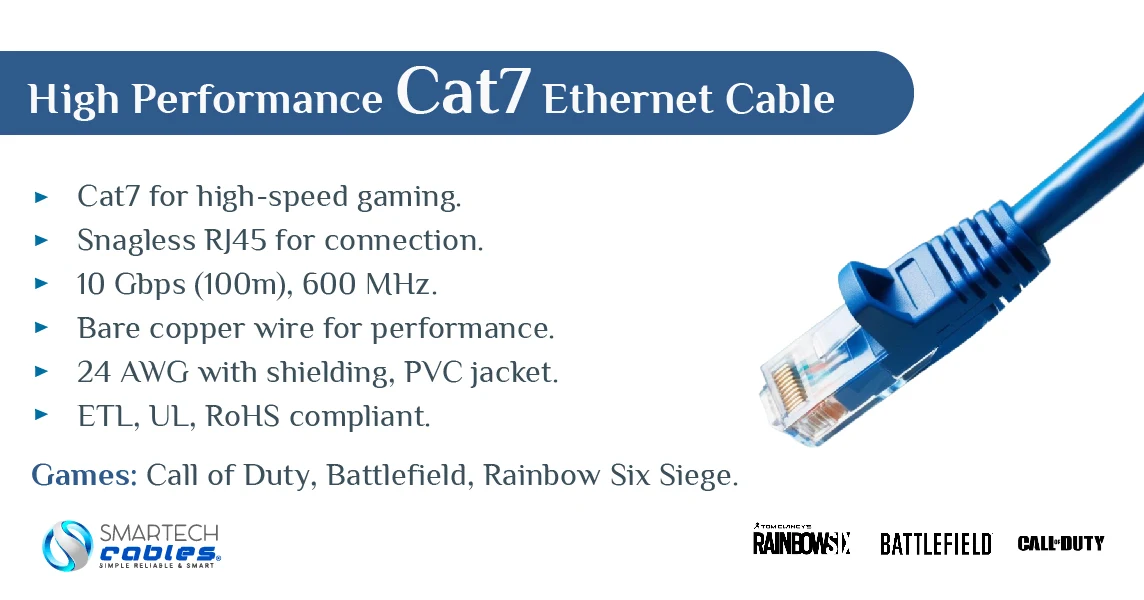
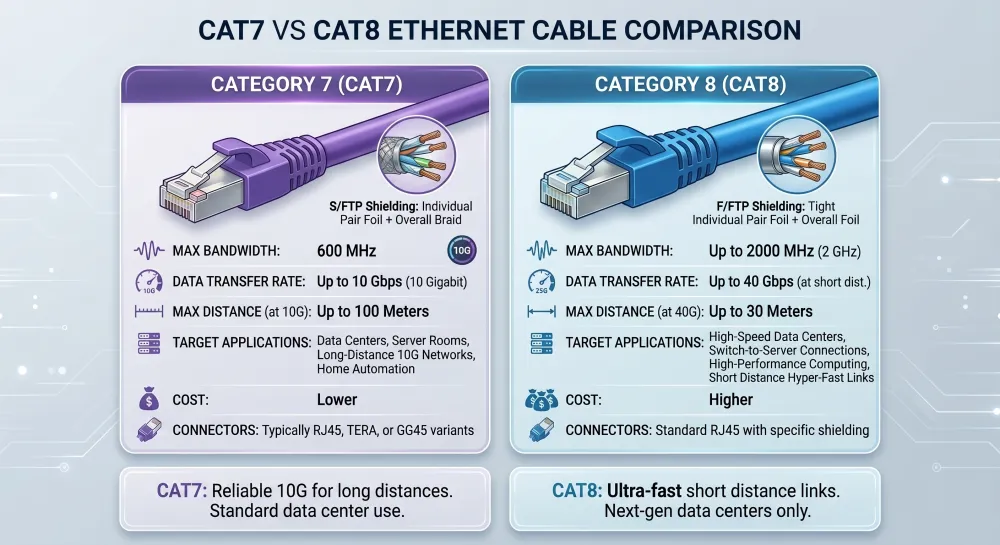
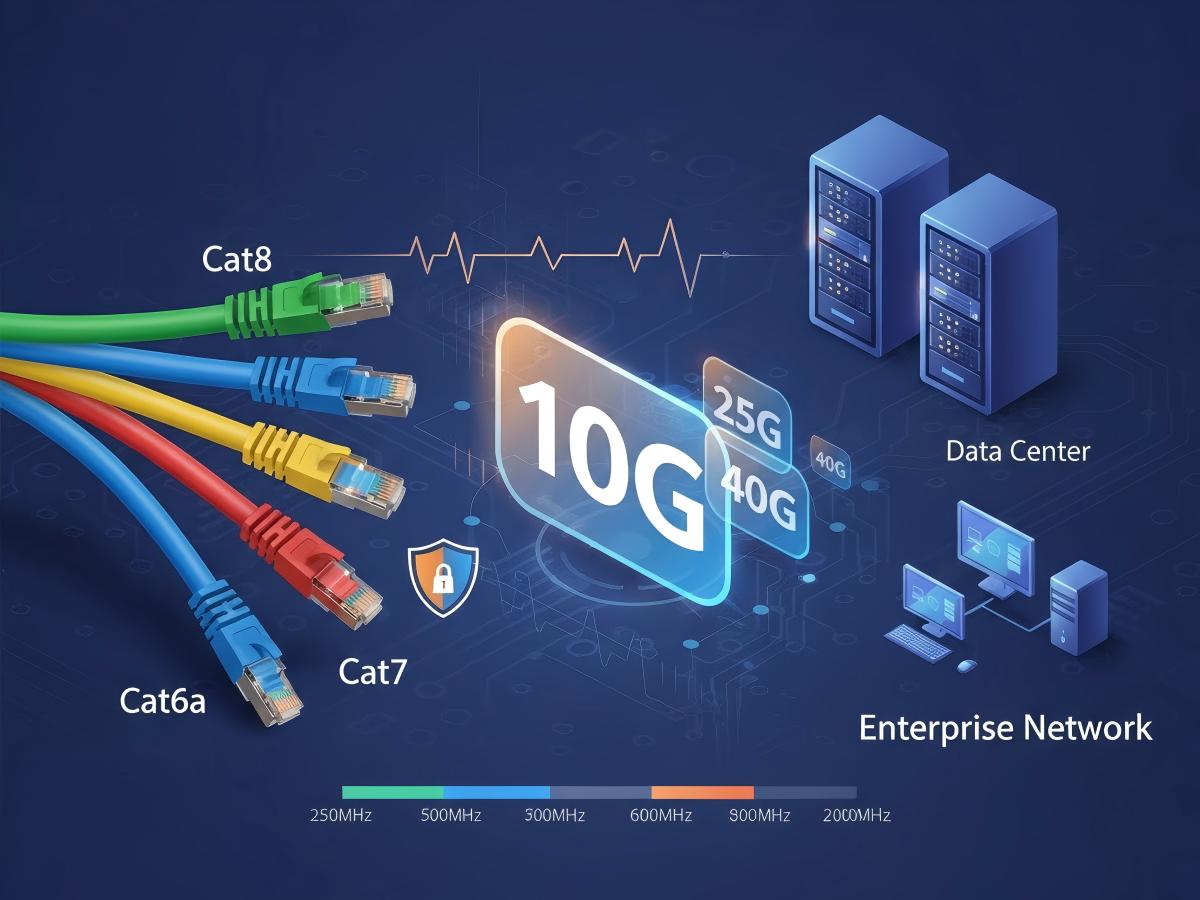
Cat7, or Category 7, is an Ethernet cable standard designed for high-speed Gigabit Ethernet over 100 meters. Its key specifications boast support for up to 10 Gigabit Ethernet (10 GbE) and a bandwidth of 600 MHz. This is a significant jump from older standards. For comparison, Cat5e supports 1 Gbps at 100 MHz, and Cat6 supports 1 Gbps at 250 MHz (with Cat6a pushing 10 Gbps at 500 MHz). What makes Cat7 stand out technically is its individual shielding for each of its four twisted copper wire pairs, along with an overall cable shield. This double shielding is intended to drastically reduce crosstalk and electromagnetic interference (EMI), leading to a cleaner signal. However, unlike Cat5e, Cat6, and Cat6a which use the standard RJ45 connector, Cat7 cables technically require GG45 or TERA connectors to meet their full shielding and performance specifications, though many Cat7 cables sold for consumers terminate in RJ45, which can limit their theoretical top-end performance and compatibility.
Is Cat7 Truly Better for Gaming Performance?
For the vast majority of US gamers, Cat7 is not truly better for gaming performance, and in many cases, it offers no discernible advantage over Cat6 or even Cat5e. Here is why: gaming primarily demands low latency and a stable connection, not necessarily ultra-high bandwidth. Most online games require very little bandwidth, often less than 1 Mbps upstream and downstream per player. Your internet service provider (ISP) connection, rather than your internal network cable, is almost always the bottleneck for speeds. If you have a 100 Mbps or 1 Gbps internet plan, a Cat6 cable can comfortably handle those speeds and more. The theoretical 10 Gbps of Cat7 becomes irrelevant if your modem and router only support 1 Gbps, or if your internet plan is 500 Mbps. Think of it like a sports car on a residential street; the car is capable of high speeds, but the road limits its actual performance.
What are the Real-World Benefits of Cat7 for Gamers?
In the typical home gaming setup, the real-world benefits of Cat7 are minimal to non-existent. While its enhanced shielding theoretically provides a cleaner signal and reduces interference, most home environments do not suffer from the extreme levels of EMI that would make this shielding a critical advantage. For a gamer whose PC is located far from strong interference sources (like heavy machinery or industrial power lines), a well-made Cat6 or Cat6a cable will perform just as reliably. The scenarios where Cat7's advanced shielding might shine are in very noisy data center environments or professional settings with extensive cable runs and high-power electrical equipment nearby. For someone simply trying to get a stable connection from their router to their gaming PC or console, the extra cost and potential compatibility issues with specialized connectors often outweigh any theoretical benefit. Your money is generally better spent optimizing your Wi-Fi, upgrading your router, or ensuring you have a decent internet plan.
When Should a Gamer Consider Upgrading to Cat7?
Frankly, very few gamers need to consider upgrading to Cat7. The niche cases where it *might* be justified are:
- Extreme Future-Proofing for Local Networks: If you are building a custom home server setup that specifically handles multi-gigabit transfers (e.g., 10 Gbps NAS, professional video editing with large file transfers) *and* you plan to upgrade all your networking hardware (switches, network cards) to support 10 Gbps Ethernet in the distant future.
- Unique High-Interference Environments: If your gaming setup is in an extremely unusual environment prone to significant electromagnetic interference that has been demonstrably causing issues with lower category cables (e.g., adjacent to a powerful radio transmitter or heavy industrial equipment), then Cat7's superior shielding *could* theoretically help. This is very rare for home users.
- Professional Streaming/Content Creation at 10 Gbps: If you are a professional streamer or content creator who needs to transfer massive files (like uncompressed 4K video) across your local network at 10 Gbps speeds, and your entire network infrastructure (NICs, switches, routers) already supports 10 Gbps, then Cat7 could provide the necessary backbone. Even then, Cat6a often suffices.
For 99% of gamers focused on online play, these scenarios do not apply. Your existing Cat5e or Cat6 is likely more than enough.
What are the Alternatives to Cat7 for Optimal Gaming?
For most gamers, Cat6 and Cat6a are far more practical and cost-effective alternatives for optimal gaming. Here is a quick breakdown:
Cat5e: Still perfectly adequate for internet speeds up to 1 Gbps. If your internet plan is 500 Mbps or less, Cat5e will not bottleneck your connection for gaming.
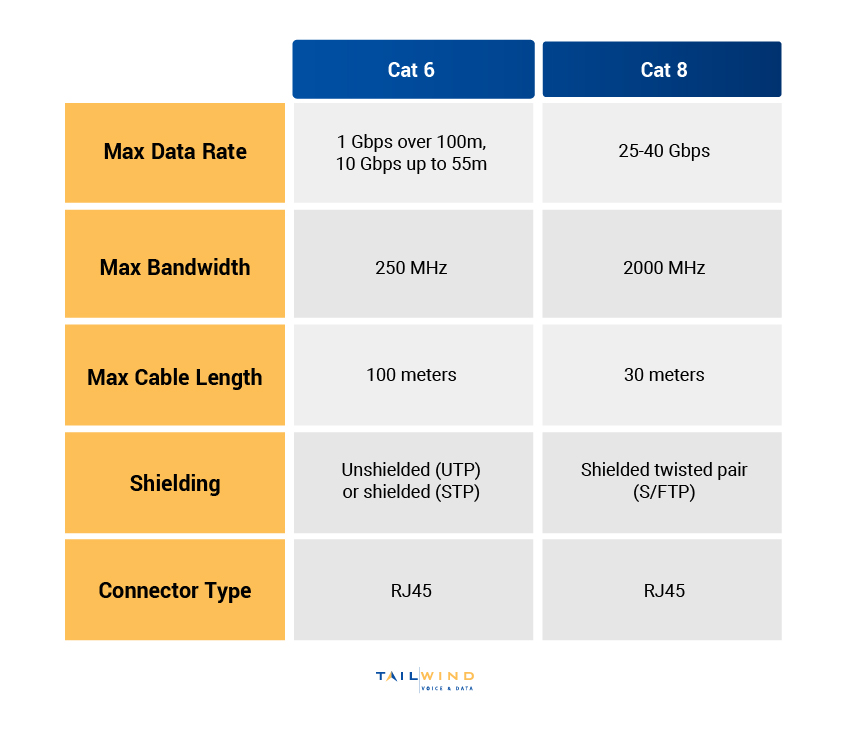
Cat6: Supports 1 Gbps up to 100 meters and can handle 10 Gbps over shorter distances (up to 55 meters). This is often the sweet spot for many gamers, providing excellent performance and stability for modern gigabit internet connections.
Cat6a: (Augmented) Supports 10 Gbps over the full 100-meter distance and operates at 500 MHz. If you have a true 2.5 Gbps or 5 Gbps internet connection (which is still rare for residential users but becoming more available) or are planning a high-speed local network, Cat6a is an excellent, more affordable choice than Cat7, without the specialized connector requirement.
When selecting a cable, ensure it is a shielded twisted pair (STP) if you are concerned about interference, though Unshielded Twisted Pair (UTP) is fine for most home use.
Does My Home Setup Even Support Cat7 Speeds?
This is a crucial question often overlooked. Even if you buy a Cat7 cable, your entire networking chain must support its theoretical capabilities for you to see any benefit. Consider these components:
Internet Service Provider (ISP) Plan: What is your subscribed internet speed? If it is 1 Gbps or less, Cat7 offers no speed advantage.
Modem and Router: Do your modem and router have Gigabit Ethernet (1 GbE) or Multi-Gigabit (2.5 GbE, 5 GbE, 10 GbE) ports? Most consumer-grade routers today still cap out at 1 Gbps for their WAN and LAN ports. Even newer Wi-Fi 6/6E routers often only have one 2.5 GbE port, with the rest being 1 GbE.
Network Card (NIC) in Your PC/Console: Does your gaming PC have a 10 Gigabit Ethernet card? Most standard motherboards come with 1 GbE NICs. Consoles like the PS5 and Xbox Series X also typically have 1 GbE ports. Upgrading to a 10 GbE NIC is an additional cost.
Switches: If you use an Ethernet switch, it also needs to support the desired speeds.
Without a full 10 GbE infrastructure from your ISP through to your gaming device, a Cat7 cable will simply operate at the speed of the slowest component in the chain, effectively acting like a Cat6 or Cat5e cable anyway.
How to Choose the Right Ethernet Cable for Your Gaming Rig?
Choosing the right cable is simpler than it seems:
Check Your Internet Speed: This is your primary bottleneck. If your plan is 1 Gbps or less, Cat5e or Cat6 is sufficient.
Examine Your Hardware: Look at the Ethernet ports on your router, modem, PC, and console. If they are all 1 GbE, a Cat6 cable is your best bet for reliability and value.
Consider Cable Length: For longer runs (over 55 meters) where you *do* have a 10 Gbps network, opt for Cat6a. For shorter runs, Cat6 is still excellent.
Shielding: For a typical home, UTP (unshielded) is fine. If you run cables near power lines or in a very electrically noisy environment, consider STP (shielded), but verify proper grounding to avoid ground loops.
Quality Over Category: A well-constructed Cat6 cable from a reputable brand will outperform a cheaply made Cat7 cable any day. Look for cables with solid copper conductors, not copper-clad aluminum (CCA), for better performance and durability.
Remember, a good quality Cat6 cable strikes the perfect balance of performance, cost, and practicality for the vast majority of gamers.
Beyond Cables: What Else Boosts Gaming Network Performance?
While we are talking about network cables, it is essential to remember that they are just one piece of the puzzle. For busy gamers juggling life, every performance tweak that yields real results is valuable. Here are other critical areas to focus on:
Quality Router: Invest in a modern router, especially one with Wi-Fi 6 (802.11ax) or Wi-Fi 6E if you have compatible devices. Good routers offer better QoS (Quality of Service) features to prioritize gaming traffic and stronger processors to handle multiple devices.
Internet Plan: Ensure your ISP plan actually provides the speed you need. A faster internal cable cannot fix a slow internet connection.
Router Placement: If using Wi-Fi, centralize your router, avoid obstructions, and keep it away from interference sources (microwaves, cordless phones).
Firmware Updates: Keep your router firmware and network adapter drivers updated. Manufacturers often release performance improvements and bug fixes.
QoS Settings: Enable Quality of Service on your router to prioritize your gaming device's traffic over other network activities (like streaming or downloads).
Reduce Network Congestion: Disconnect unused devices, pause large downloads, and avoid simultaneous heavy streaming on other devices while gaming.
These optimizations often yield far greater improvements in latency and stability than upgrading from Cat6 to Cat7.
Dispelling Myths: Common Misconceptions About Gaming Ethernet Cables
The world of gaming hardware is ripe with myths, and Ethernet cables are no exception. Let us debunk a few common ones:
Myth 1: Higher Category = Lower Ping: Not directly true. While a stable connection is crucial for low ping, a Cat7 cable will not inherently lower your ping if your internet connection or game server is the limiting factor. Ping is more about the distance to the server and network congestion than cable category.
Myth 2: Gold Plated Connectors Make a Huge Difference: While gold plating prevents corrosion over time, a thin layer is all that is needed. Extra thick gold plating on connectors is mostly marketing and does not impact signal quality or speed for home use.
Myth 3: Expensive Cables are Always Better: Price does not always equate to performance. A reasonably priced, well-certified Cat6 cable from a reputable brand will often perform identically to a much more expensive Cat7 cable for gaming purposes.
Myth 4: Cat7 is Essential for 4K Gaming: 4K gaming (streaming or online multiplayer) primarily taxes your GPU and internet bandwidth. The actual data rate required by the game itself over your local network is still relatively small. A Cat6 cable handles this perfectly.
Can Cat7 Help with Ping or Latency Issues?
The short answer is: **no, not really.** Cat7 itself will not magically fix your ping or latency issues. Ping, which measures the time it takes for a signal to travel from your computer to a server and back, is primarily affected by factors *outside* your Ethernet cable's category. These include:
Distance to the game server: The farther away the server, the higher the ping.
Internet Service Provider (ISP) network congestion: Your ISP's infrastructure and how many users are active at a given time can significantly impact latency.
Router/modem performance: An old or overloaded router can introduce delays.
Wi-Fi interference: If you are on Wi-Fi, interference can cause packet loss and higher latency. This is why a wired connection (even Cat5e) is almost always superior to Wi-Fi for gaming.
While a *faulty* or *poorly made* cable of *any* category can introduce packet loss and thus increase *effective* latency, simply upgrading from a working Cat5e or Cat6 to Cat7 will not reduce your ping further. The internal propagation delay difference between cable categories is measured in picoseconds, which is utterly negligible for human perception and gaming.
In conclusion, while Cat7 cables offer impressive theoretical specs, they are largely overkill for the average US gamer. For most of us balancing work, family, and our passion for gaming, a good quality Cat6 or Cat6a cable will provide all the performance, stability, and future-proofing we need, without the extra cost or compatibility headaches. Focus your optimization efforts on your internet plan, router, and ensuring a solid wired connection. What is your biggest gaming challenge when it comes to network performance? Comment below and let us help each other out!
FAQ Section
Q: Is Cat7 compatible with my existing RJ45 ports?
A: Yes, most Cat7 cables sold for consumer use come terminated with RJ45 connectors, making them physically compatible with standard Ethernet ports on your PC, console, or router. However, using an RJ45 connector means it does not meet the full shielding requirements for the Cat7 standard, and you will not see any performance benefits beyond what a Cat6a cable offers.
Q: Will Cat7 stop lag in online games?
A: No, Cat7 alone will not stop lag. Lag is usually caused by factors like your internet speed, distance to the game server, network congestion (either at your home or with your ISP), or an overloaded router. A Cat7 cable provides no significant advantage over Cat6 or Cat6a in preventing lag, as these cables already handle the necessary speeds for gaming.
Q: Is Cat7 worth the extra cost for a home gamer?
A: For the vast majority of home gamers, Cat7 is not worth the extra cost. Cat6 or Cat6a cables offer more than sufficient bandwidth and performance for current and foreseeable future gaming needs, including 1 Gbps and even 2.5/5/10 Gbps networks, without the premium price tag or specialized connector requirements of true Cat7.
Q: What is the best Ethernet cable for PS5 or Xbox Series X?
A: For consoles like the PS5 and Xbox Series X, which typically have 1 Gigabit Ethernet ports, a good quality Cat6 Ethernet cable is the ideal choice. It provides a stable, low-latency connection that perfectly matches the console's network capabilities and your internet speed, with no need for Cat7.
Q: Can Cat7 improve my download and upload speeds?
A: Cat7 can only improve your download and upload speeds if your internet plan offers speeds higher than what a Cat6 cable can handle (i.e., significantly above 1 Gbps) AND your entire network infrastructure (modem, router, network adapter) also supports those higher speeds. For typical residential internet, the cable category beyond Cat6 will not be the limiting factor.
Conclusion
Navigating the jungle of networking gear can be tough, especially when you are just trying to get that perfect gaming session in after a long day. We have seen that while Cat7 cables boast impressive specifications, for the average US gamer balancing work and life, they are almost always overkill. Your trusty Cat6 or Cat6a cable is more than capable of delivering the stable, low-latency connection needed for fluid online gaming, supporting all the high-bandwidth activities you throw at it, well within the limits of most home internet plans and hardware. Remember, optimizing your entire network chain, from your ISP to your router settings, will yield far greater improvements than simply upgrading to a higher category cable. Invest smart, play hard, and keep those virtual adventures going strong. What is your biggest gaming challenge? Comment below!
Cat7 offers theoretical speeds up to 10 Gbps and 600 MHz bandwidth. For most current gaming, Cat6 or Cat6a provide sufficient speed and bandwidth. Cat7 requires special GG45 or TERA connectors, which are not common on standard gaming hardware. Upgrading to Cat7 is often overkill for typical home network and internet speeds. Focus on your internet plan and router before considering Cat7 for gaming. Cat7's primary benefit is future-proofing and superior shielding in specific enterprise environments, not consumer gaming.
35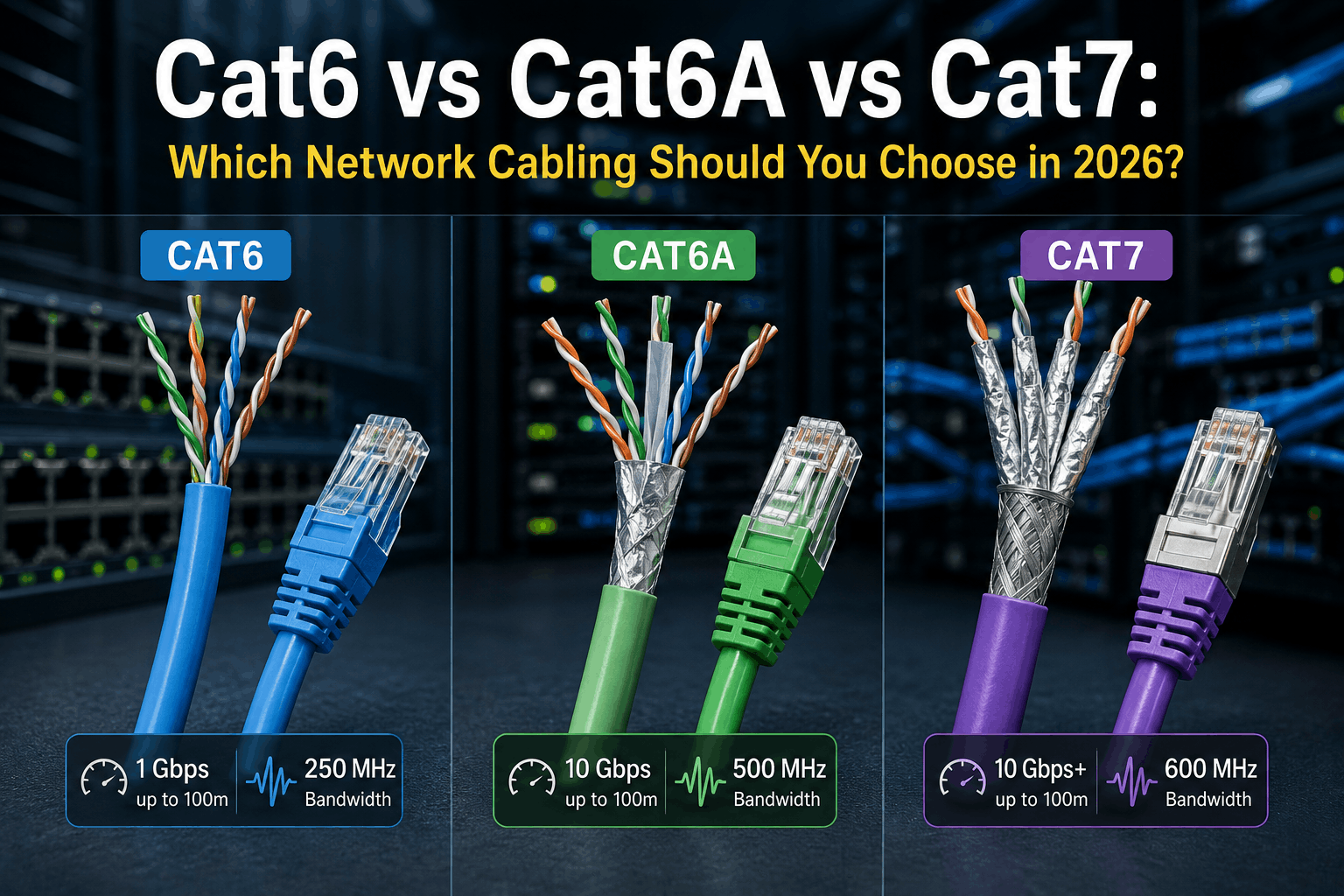

Cat6 Vs Cat6A Vs Cat7 2026 Network Cabling Comparison Guide Cat6 Vs Cat6A Vs Cat7 Which Network Cabling Should You Choose In 2026 . The Best Ethernet Cables For Gaming In 2025 Image 17 . Cat6 Vs Cat7 Vs Cat8 Speed Comparison Which To Buy 2026 DataFeature Cat6 Vs Cat7 Vs Cat8 Cables Whats The Difference . The Best Ethernet Cable For Gaming Cat6 Vs Cat7 And The True Speed Best Ethernet Cable For Gaming. Cat6 Vs Cat6A Vs Cat7 2026 Network Cabling Comparison Guide Cat6 Vs Cat6A Vs Cat7

Cat6 Vs Cat6A Vs Cat7 For 10GBASE T 2026 Engineering Guide Network SEOon 10GBase T Over Cat6 Vs Cat6A Vs Cat7 . Cat6 Vs Cat7 Ethernet Cables Key Differences In Speed Performance KLM . Cat7 Vs Cat8 What S The Difference Cat7 VS Cat8 Patch Cable.webp. Best Ethernet Cables For Gaming In 2026 All You Need To Know Jadaol Cat6 Flat Ethernet Cable One Of The Best Ethernet Cables For Gaming In 2025 . Best Ethernet Cables For Gaming In 2026 All You Need To Know Cable Matters 10 Gbps Snagless CAT6 Ethernet Cable One Of The Best Ethernet Cables For Gaming In 2025

Best Ethernet Cables For Gaming In 2026 All You Need To Know Amazon Basics RJ45 CAT6 Ethernet Cable One Of The Best Ethernet Cables For Gaming In 2025 . Best Ethernet Cable For Gaming Cat8 Cat7 Speed Guide Best Ethernet Cable For Gaming. 7 Best Ethernet Cables For Gaming In 2026 Tested And Reviewed AD 0 MKP .webp. Cat5e Vs Cat6 Vs Cat6a Vs Cat7 Which Network Cable Is Best For Your Catagory Cable 1200x800 . Best Ethernet Cable For Gaming In 2025 Cat 6 Vs Cat 7 Vs Cat 8 Zion Best Ethernet Cable For Gaming In 460 460


Gaming With Cat6 The Best Ethernet Cable For Players Is Cat6 Cable Good For Gaming.webp. Gaming With Cat6 Ethernet Cable The Ultimate Choice TURNSTONE CABLES 91 . Cat6 Vs Cat6a Which Ethernet Cable Is Right For Your Network Cat6 And Cat6a Ethernet Cables LAN Structured Cabling 980x653 . Cat7 Vs Cat8 Cables What S The Difference In 2026 TURNSTONE CABLES 4 Fb68f904 Bcfb 4424 Aee3 . 2026 Cat6 Ethernet Guide Performance PoE And Real World Application SEOon Cat6 Cabling 2026



What Is The Cat8 Cable . Cat 6 Vs Cat 7 Vs Cat 8 Key Differences How To Choose One Tailwind Blog Inline1 . Cat5e Vs Cat6 Vs Cat7 How To Identify Ethernet Cable Types Noyafa Cat5e Vs Cat6 Vs Cat7 . Cat7 Vs Cat8 Vs Fiber Optic Cable Ultimate Guide 2026 Cat7 Vs Cat8 Which Is Better For Your Network . Cat6 Vs Cat7 Ethernet Cable Differences Uses ANPU 2 4.webp


Speeds Of Cat5e Cat6 Cat6a Cat7 And Cat8 Cables Compared Cablify Speeds Of Category Cables 1 850x500 . Cat7 Vs Cat8 What S The Difference Cat7 VS Cat8 Bulk Cable. Ethernet Cable Categories Explained Cat5e Cat6 Cat6a Cat7 2026 Guide Unnamed 55 1024x417 . Upgrade To Cat6A Cat7 Cabling Bluechip Gulf CAT 1 . Best Ethernet Cables For Gaming In 2026 All You Need To Know Veetop CAT7 Flat Ethernet Cable One Of The Best Ethernet Cables For Gaming In 2025



Ethernet Cable For Gaming The Ultimate 2026 Guide To Faster Lag Free Airtable 1.webp. Top 5 Newest Wi Fi 7 Gaming Router In 2026 Reviews Buying Guide . Cat6 Vs Cat6a Vs Cat7 Vs Cat8 Best For Running 10GBASE T In 2026 SEOon Different Cabling For Running 10GBASE T . Cat6 Vs Cat7 For Gaming Which One Is Right For You Finddiffer Com Cat6 Vs Cat7 For Gaming . The 3 Best Ethernet Cables For Gaming In 2026 Unveiling Gears Review