Ever wondered how does frame rate affect gaming and why it matters so much for your enjoyment and competitive edge? This comprehensive guide dives deep into the world of FPS, explaining everything from what frame rate is to how it impacts your gameplay, reaction time, and overall immersion. Discover practical tips on optimizing your settings for smoother performance, balancing visual quality with fluid motion, and making smart hardware upgrade decisions on a budget. We cover common pain points like screen tearing and input lag, offering solutions to enhance your gaming sessions, whether you are a casual player enjoying cozy games with friends or a competitive enthusiast aiming for peak performance. Learn how to get the most out of your setup without breaking the bank or sacrificing precious family time. Understand the latest trends in gaming hardware and software, ensuring your experience is always top-notch and stress-free. This article is your ultimate resource for navigating the technical aspects of gaming performance, designed specifically for US gamers who value both fun and efficiency. Get ready to transform your understanding of frame rate and unlock a truly optimized gaming experience. We're here to help you game smarter, not harder.
What is Frame Rate (FPS) and How Does it Affect Gaming?
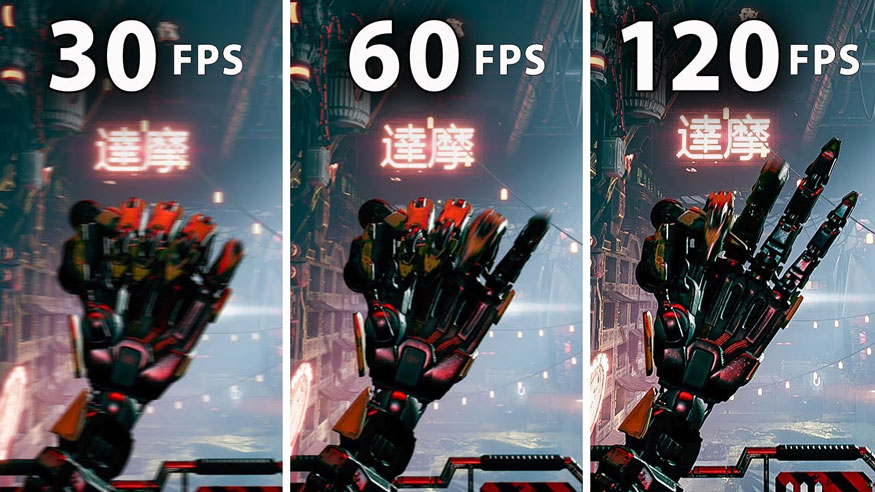
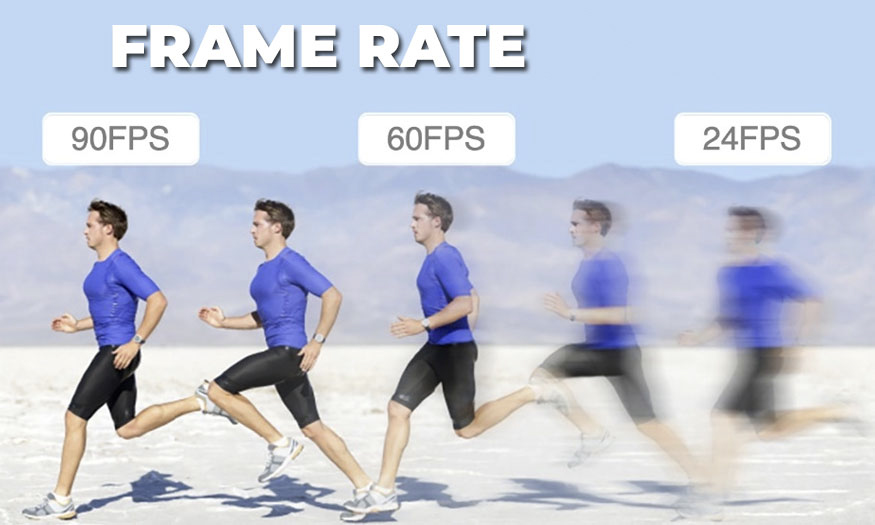
Frame rate, or FPS (Frames Per Second), indicates how many images your graphics card renders and your monitor displays each second. In gaming, a higher FPS means smoother visuals, more fluid motion, and a more responsive experience. Low frame rates lead to choppy gameplay, input lag, and a generally less enjoyable time, directly impacting your ability to react quickly and immerse yourself in the game world.
Why Do Professional Gamers Prioritize High FPS Over Graphics Settings?
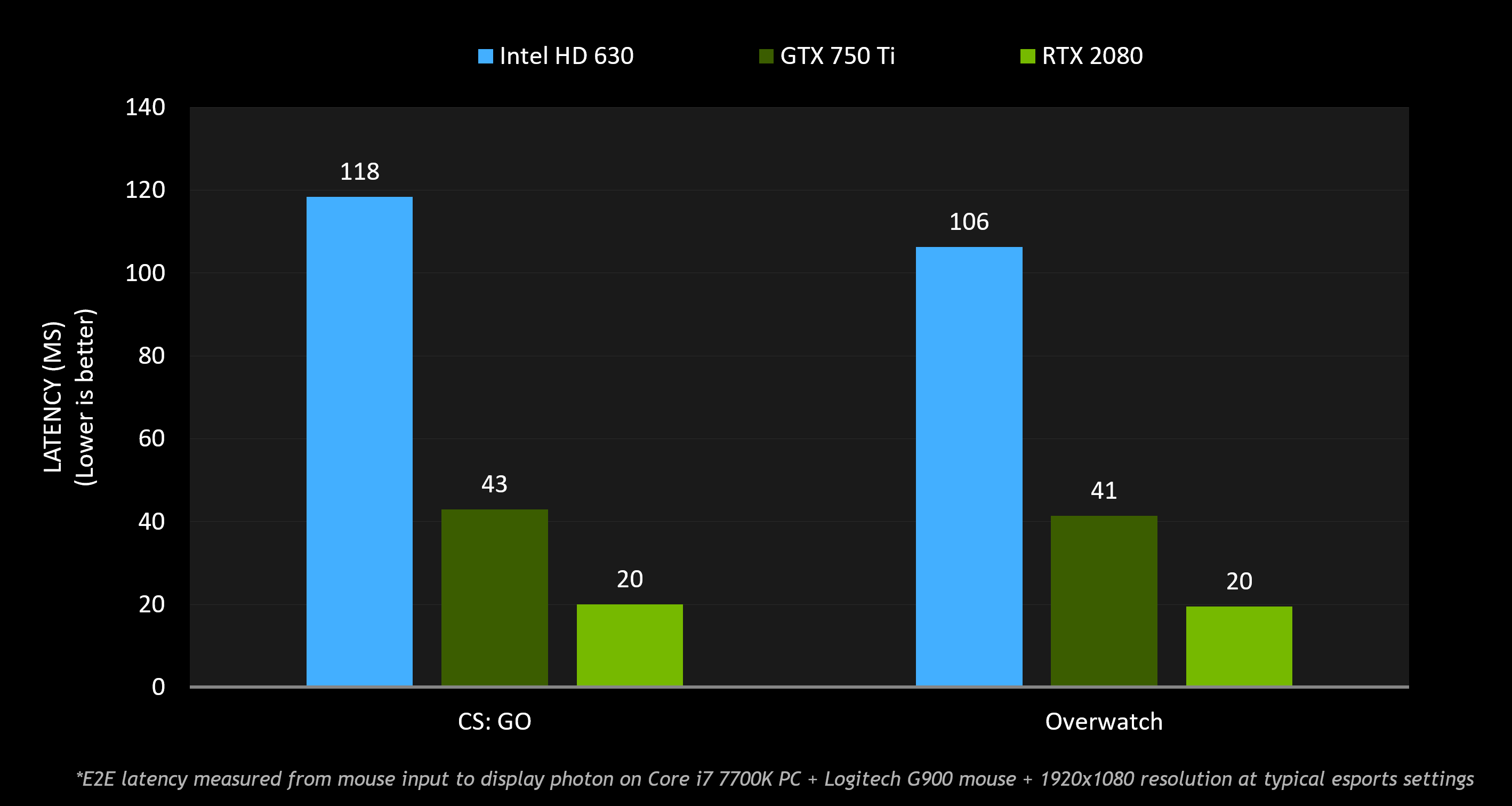
Professional gamers prioritize high FPS because it provides a significant competitive advantage. Higher frame rates reduce input lag and offer more up-to-date visual information, allowing for quicker reactions, more precise aiming, and a clearer view of fast-moving targets. In competitive scenarios, even a few milliseconds of delay can determine victory or defeat, making FPS a critical performance metric.
How Does My Monitor's Refresh Rate Influence My Actual In-Game FPS?
Your monitor's refresh rate (measured in Hz) dictates the maximum number of frames it can display per second. If your graphics card renders 100 FPS but your monitor is only 60Hz, you'll effectively only see 60 frames per second unless technologies like V-Sync or adaptive sync are used. For the smoothest experience, your in-game FPS should ideally match or exceed your monitor's refresh rate to fully utilize its capabilities and avoid screen tearing.
What Are the Best Ways to Optimize My Frame Rate Without Buying New Hardware?
To optimize frame rate without new hardware, start by updating your graphics drivers. Then, adjust in-game settings: lower demanding options like anti-aliasing, shadow quality, and post-processing effects. Close unnecessary background applications, ensure your system has good airflow to prevent overheating, and consider using V-Sync or adaptive sync if screen tearing is an issue. These steps can significantly improve performance.
When Should I Consider Upgrading My Graphics Card or CPU for Better Frame Rate?
You should consider upgrading your graphics card or CPU when you've exhausted all software optimization options and are still consistently unable to achieve desirable frame rates (e.g., stable 60 FPS for casual, 120+ FPS for competitive) in your favorite games. If you notice a clear bottleneck in your current hardware, such as your GPU or CPU constantly running at 99-100% usage, it's a strong indicator that an upgrade would yield substantial improvements.
What are the tell-tale signs of low frame rate affecting my gameplay?
The most common tell-tale signs of low frame rate affecting your gameplay include visible stuttering or choppiness on screen, a noticeable delay between your inputs (mouse clicks, key presses) and the corresponding actions in the game, and a general feeling of sluggishness or unresponsiveness during fast-paced sequences. You might also experience screen tearing, where the image appears horizontally split, especially if V-Sync is off.
Is a higher frame rate more important for PC gaming or console gaming?
While both benefit, a higher frame rate is often considered more critical for PC gaming due to the prevalence of high refresh rate monitors (144Hz+) and the competitive nature of many PC titles. Console gaming traditionally targeted 30 or 60 FPS, but newer consoles offer performance modes with higher frame rates. Ultimately, the importance depends on the game and individual player preference, though competitive players on any platform will seek higher FPS.
Hey fellow gamers! Ever sat down after a long day, ready to unwind with your favorite title, only to feel like something’s just... off? Maybe the action felt a little sluggish, or that crucial headshot didn't land even though your aim was perfect. For many of us balancing work, family, and life, gaming is our escape, our way to de-stress, build skills, or connect with friends. But nothing kills that vibe faster than a choppy, unresponsive game. This month, as 87% of US gamers regularly dive into virtual worlds, often for 10+ hours a week, and social gaming continues its upward trend, understanding the bedrock of smooth gameplay—frame rate—is more important than ever.
You might have heard terms like 'FPS' or 'refresh rate' thrown around, but what do they really mean for your precious gaming time? How does frame rate affect gaming, specifically *your* gaming? This article is designed for you: the adult gamer who wants to get the most out of their system without spending hours troubleshooting or breaking the bank on unnecessary upgrades. We’ll demystify frame rate, explore its impact on everything from reaction time to immersion, and arm you with practical, budget-friendly tips to optimize your experience. No hype, just real solutions so you can spend less time frustrated and more time enjoying your digital adventures. Let’s dive in and unlock smoother, more responsive gameplay together.
What Exactly is Frame Rate (FPS) and Why Does it Matter?
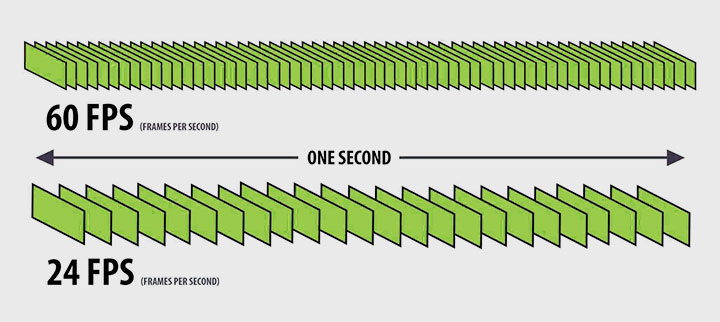
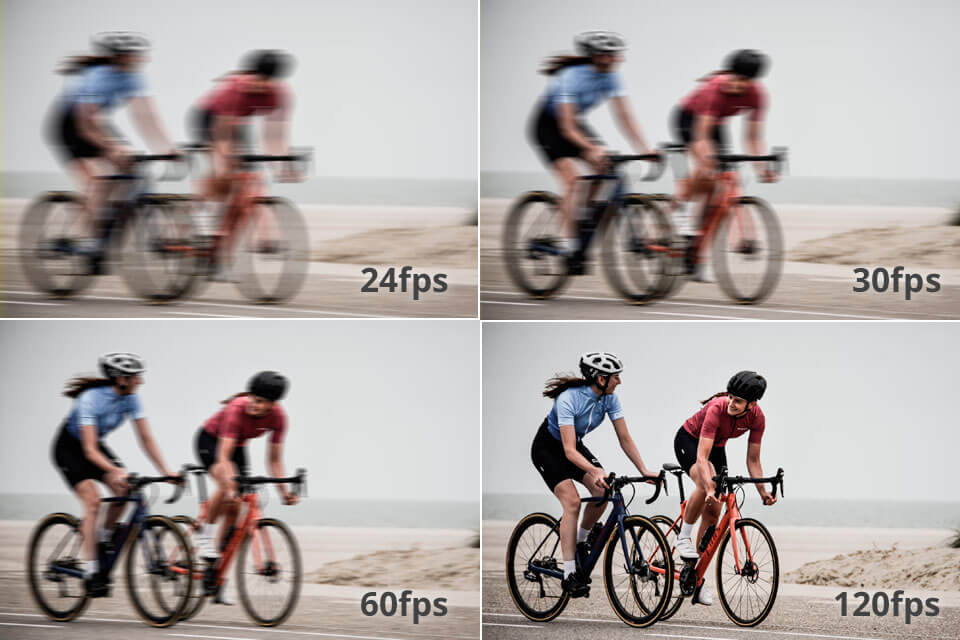
Frame rate, often measured in Frames Per Second (FPS), is essentially how many individual images your graphics card renders and your monitor displays each second. Think of it like a flipbook: more pictures per second mean a smoother, more fluid animation. For gamers, a higher FPS translates directly into a more responsive and immersive experience. In 2026, with games becoming increasingly demanding and players seeking ultra-smooth visuals, a consistent, high frame rate is paramount.
Why does it matter so much? Because a low frame rate can make games feel sluggish, cause input lag (the delay between your mouse click and the action on screen), and introduce visual stuttering or tearing. For many of us who squeeze gaming into busy schedules, these issues can quickly turn relaxation into frustration. Conversely, a high, stable frame rate makes everything feel immediate and natural, allowing you to react faster and enjoy the game as the developers intended.
How Does Frame Rate Directly Impact Your Gaming Performance and Experience?
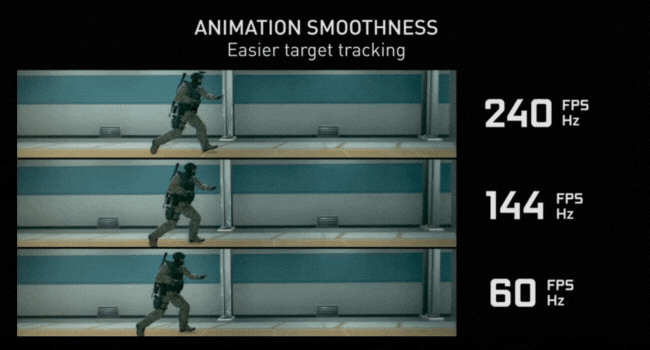
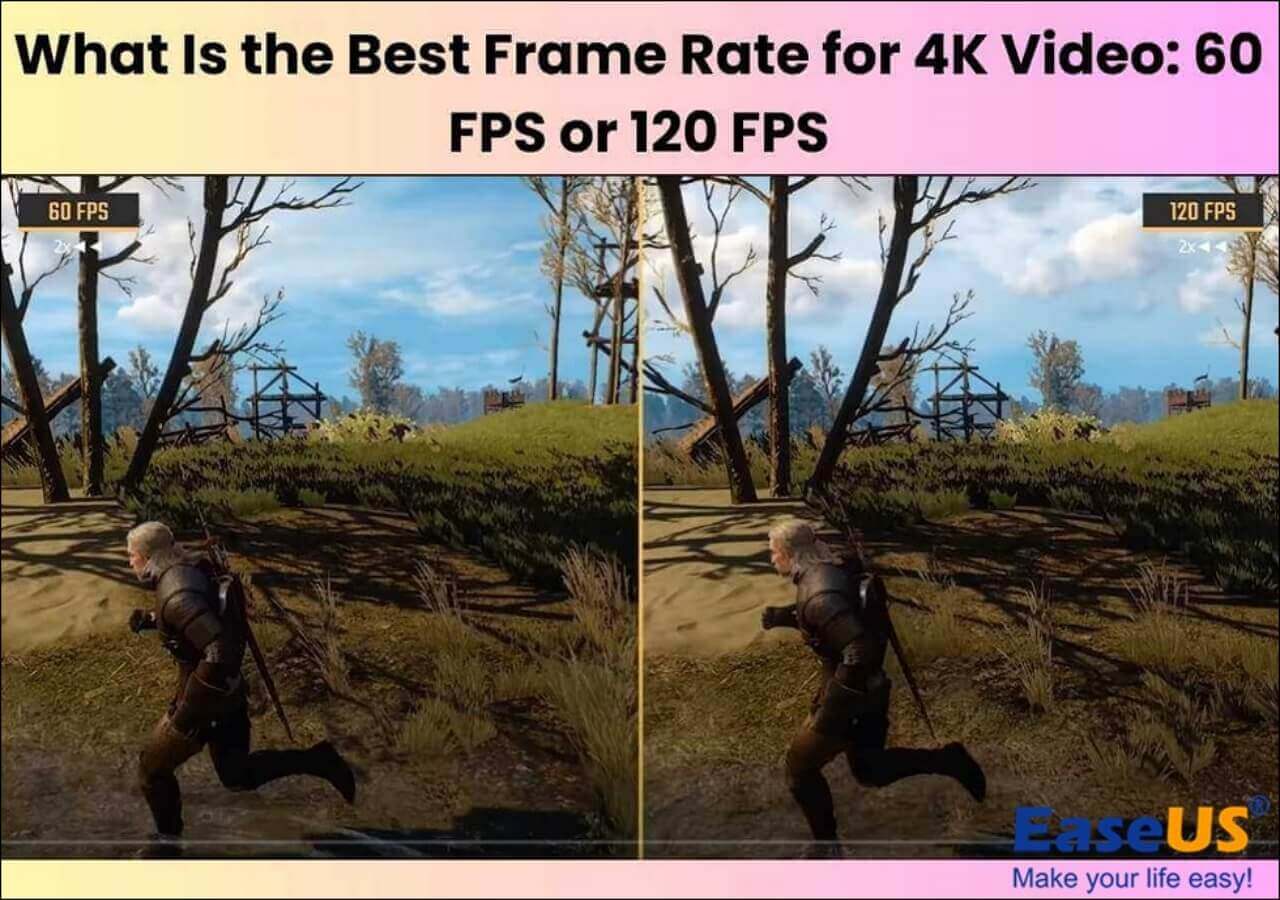
The impact of frame rate on your gaming experience is multifaceted, touching upon responsiveness, visual clarity, and even your overall enjoyment. When your frame rate is consistently high, particularly above 60 FPS, your game feels incredibly fluid. This smoothness allows for precise aiming in shooters, quick decision-making in strategy games, and seamless navigation in open-world titles. The visual information you receive is more current, giving you a competitive edge.
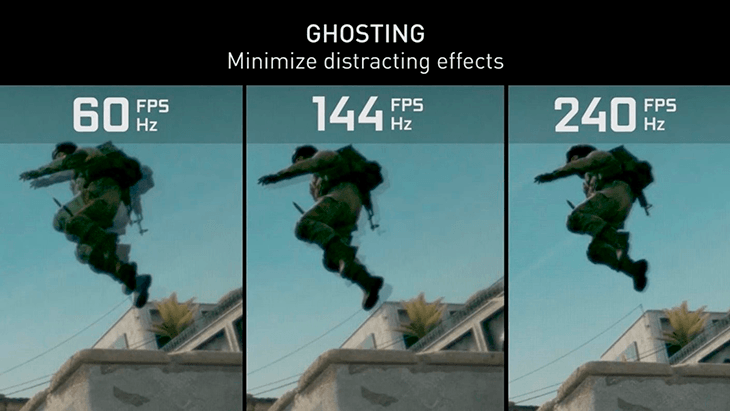
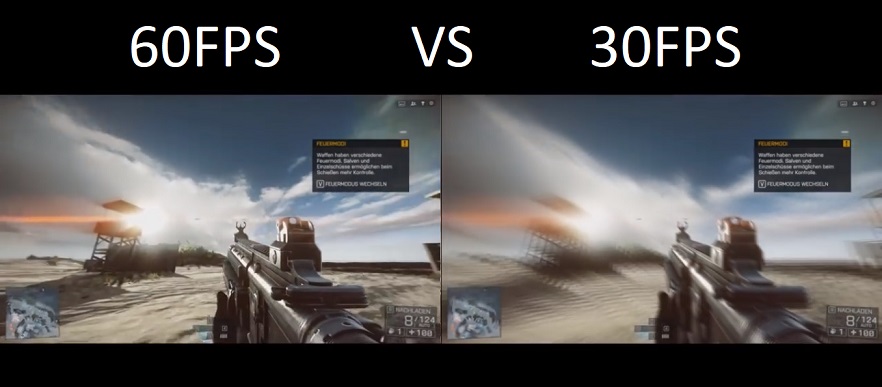
Beyond responsiveness, high frame rates significantly reduce visual artifacts like screen tearing, where the monitor displays parts of multiple frames simultaneously, creating a jagged line across the screen. They also minimize ghosting and motion blur, making fast-paced action clearer and easier to follow. For the average US gamer who enjoys a mix of competitive titles and relaxing story-driven adventures, these improvements lead to greater immersion and less eye strain. Whether you're chasing that elusive win in an esports title or just exploring a new world, a stable frame rate enhances every moment.
What's the Ideal Frame Rate for Different Types of Games?
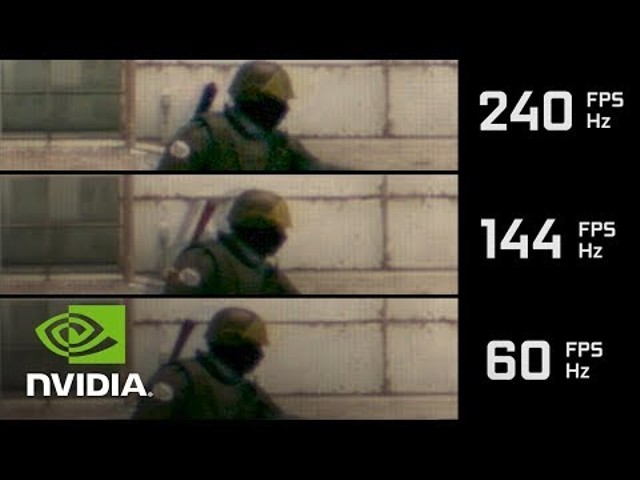
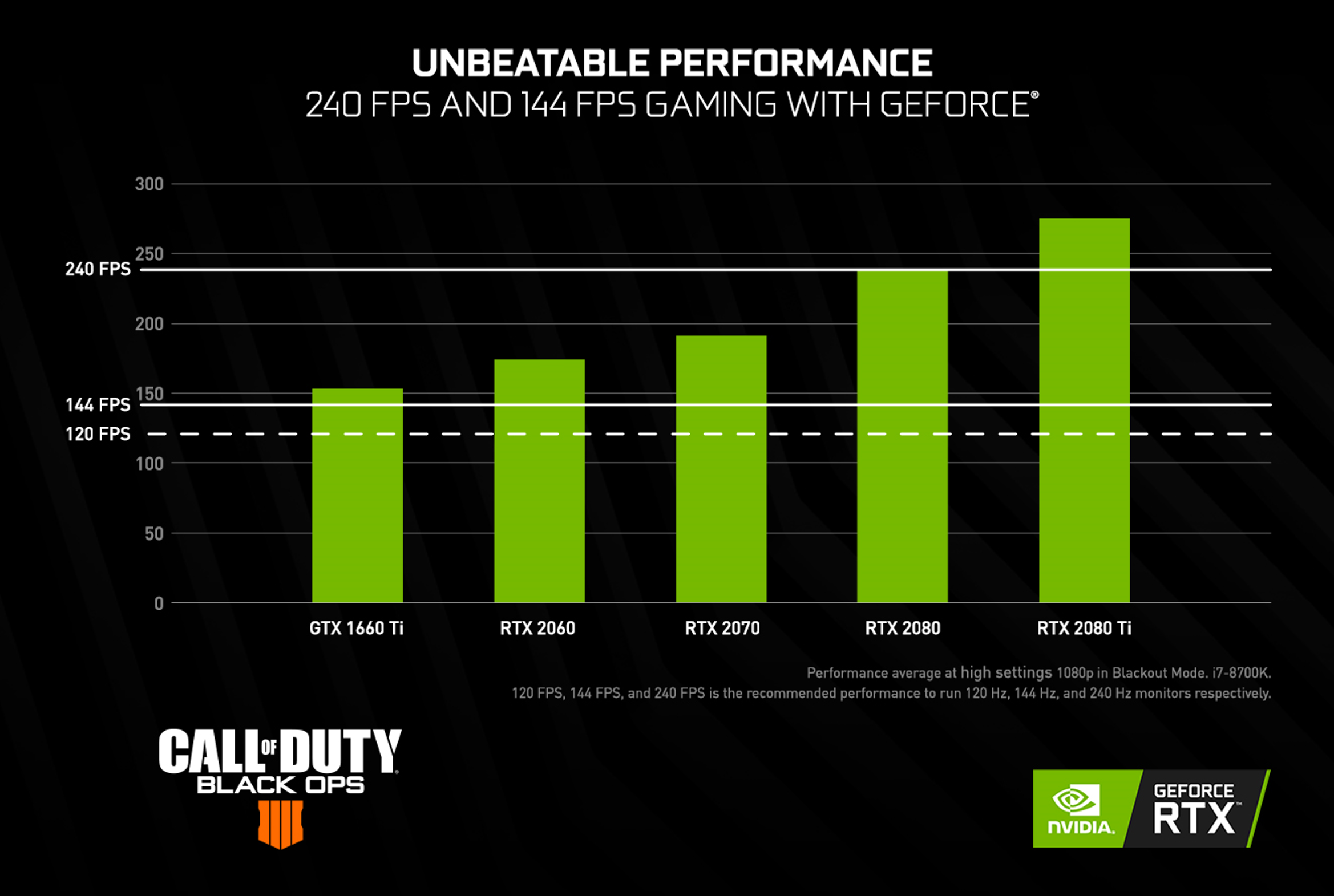
The 'ideal' frame rate isn't a one-size-fits-all number; it heavily depends on the game genre and your personal preferences. For fast-paced competitive games like Valorant, Apex Legends, or Call of Duty, aiming for 144 FPS or even 240 FPS (if your monitor supports it) is highly recommended. This ultra-high frame rate provides minimal input lag and maximum visual information, giving you a crucial advantage in split-second reactions.
For story-driven single-player games, RPGs, or cozy games like Animal Crossing or Stardew Valley, a stable 60 FPS is generally considered excellent. These games prioritize visual fidelity and atmospheric immersion over lightning-fast reflexes, so a consistent 60 FPS offers a beautiful and smooth experience without needing top-tier hardware. Mobile games, a dominant force in US gaming with cross-play becoming more common, typically target 30-60 FPS for battery life and device compatibility, though newer flagship phones can often achieve higher.
Can a High Frame Rate Really Improve Your Reaction Time?
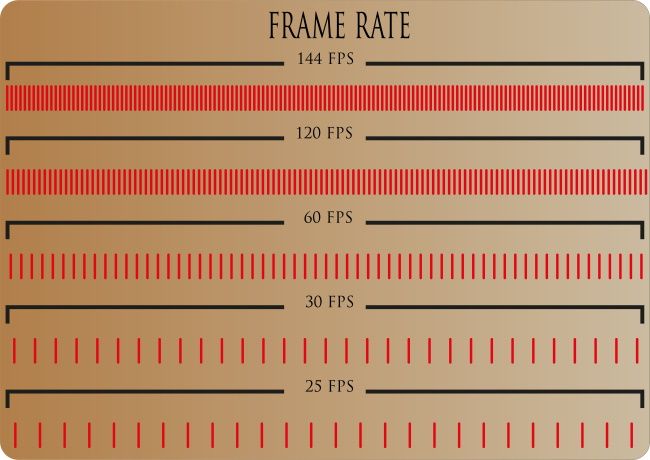
Absolutely, a higher frame rate can significantly improve your perceived reaction time and overall responsiveness. While your biological reaction time is fixed, a game running at a higher FPS provides more up-to-date visual information to your brain. For instance, moving from 30 FPS to 60 FPS means you're seeing new frames twice as often. Upgrading to 144 FPS means you're seeing new information nearly five times as often as 30 FPS. This reduces the 'delay' between an in-game event happening and you seeing it on your screen.
In competitive scenarios, every millisecond counts. Seeing an enemy appear on screen even a few frames earlier can mean the difference between getting the first shot off or being eliminated. This isn't just theory; many professional esports players cite high frame rates as a non-negotiable part of their setup, allowing their natural reflexes to be translated into game actions with minimal latency. It’s about minimizing the technical barriers so your skill can truly shine.
How Do Refresh Rate and Frame Rate Work Together?
Frame rate (FPS) and refresh rate (Hz) are often confused, but they're two sides of the same coin when it comes to smooth visuals. Frame rate is how many frames your graphics card *produces* per second. Refresh rate is how many times your monitor *updates* its image per second. For the smoothest experience, your FPS should ideally match or exceed your monitor’s refresh rate. If your graphics card pushes 100 FPS but your monitor only has a 60Hz refresh rate, you're essentially seeing only 60 of those 100 frames, or experiencing screen tearing if V-Sync isn't enabled.
Conversely, if your monitor is 144Hz but your game is only running at 50 FPS, you won't get the full benefit of that high refresh rate; the monitor will simply display the same frame multiple times while it waits for a new one. This month, high refresh rate monitors (144Hz+) are becoming more affordable and standard for PC gamers. Investing in one is a smart move if you're serious about competitive gaming or simply want the most fluid visuals possible, especially if your GPU can consistently deliver high FPS.
What are Common Frame Rate Issues and How Can You Troubleshoot Them?
Even with good hardware, frame rate issues can pop up. Common problems include stuttering, screen tearing, and inexplicable drops in FPS during intense moments. Stuttering often occurs when your system struggles to maintain a consistent frame rate, leading to brief freezes. Screen tearing, as mentioned, is when parts of different frames are displayed simultaneously, often due to FPS and refresh rate being out of sync without V-Sync.
Update Drivers: Always start here. Outdated graphics card drivers are a leading cause of performance issues. Check NVIDIA, AMD, or Intel websites regularly.
Adjust In-Game Settings: Lower demanding settings like Anti-aliasing, Shadow Quality, and Texture Quality. Experiment to find the sweet spot between visuals and performance.
Monitor Background Processes: Close unnecessary applications running in the background. Discord, web browsers, and streaming software can consume valuable CPU and GPU resources.
Check for Overheating: Ensure your PC or console has adequate ventilation. Overheating components can throttle performance to prevent damage.
Enable V-Sync/Adaptive Sync: V-Sync can eliminate screen tearing by synchronizing your FPS with your monitor's refresh rate, though it can introduce a slight input lag. Adaptive Sync technologies like FreeSync (AMD) or G-Sync (NVIDIA) offer similar benefits without the input lag, but require compatible hardware.
Clean Your System: Dust buildup can hinder cooling. A quick clean can sometimes resolve thermal throttling issues.
When is it Time to Consider a Hardware Upgrade for Better FPS?
For many gamers, the question of 'when to upgrade' looms large, especially with budgets and busy lives. If you've tried all the software optimizations and still can't achieve your desired frame rates, especially in newer titles or the games you play most, it might be time for a hardware upgrade. This is particularly true if your GPU is struggling to keep up, or if your CPU is bottlenecking your system. For example, if you're consistently dipping below 60 FPS in games you care about, or if you want to experience games at 144Hz on a new monitor, an upgrade is likely necessary.
Don't jump for the most expensive components immediately. Focus on what's bottlenecking your system. Often, a new graphics card offers the biggest performance boost for gaming. Sometimes, simply adding more RAM (e.g., upgrading from 8GB to 16GB) or switching to an SSD can significantly improve overall system responsiveness and load times. Keep an eye on sales and budget-friendly options. Many gamers find value in upgrading incrementally rather than a full system overhaul, especially with the current hardware trends making powerful components more accessible.
How Can I Balance Graphics Quality and Frame Rate for Optimal Enjoyment?
Finding the perfect balance between stunning visuals and smooth frame rates is an art, not a science, and it’s a constant consideration for gamers who want value for money. Most games offer a wealth of graphics settings, and understanding which ones are most demanding is key. Settings like ray tracing, anti-aliasing, shadow quality, and ambient occlusion often have the biggest impact on FPS. You don’t always need to play on ‘Ultra’ to have a fantastic experience.
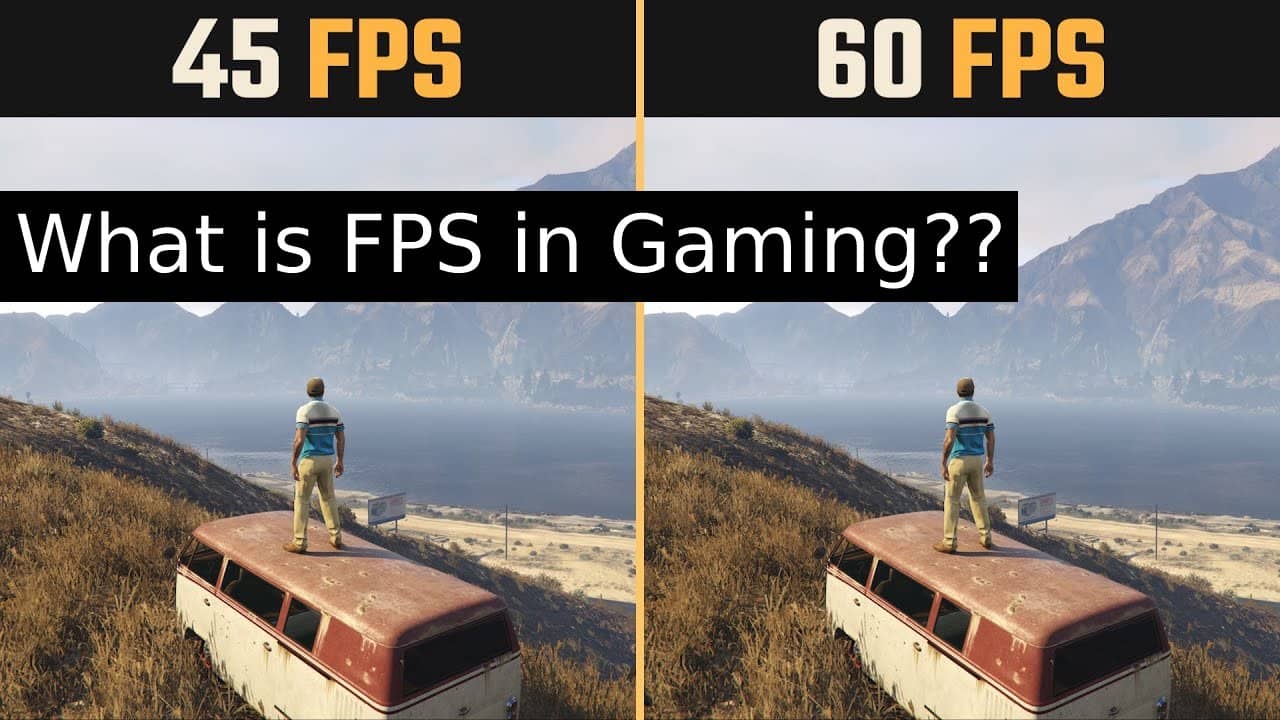
Start by setting everything to a medium preset, then gradually increase individual settings like texture quality or draw distance to see how they affect your FPS using an in-game monitor or tools like MSI Afterburner. Prioritize settings that enhance immersion without crippling performance. For instance, high texture quality often looks great and has less impact on FPS than complex shadow rendering. Remember, a stable 60 FPS on 'High' settings will almost always feel better than a fluctuating 30-45 FPS on 'Ultra' settings. It's about personal preference and what feels good to *you* after a long day.
Conclusion
Understanding how does frame rate affect gaming is fundamental to unlocking the best possible experience, especially for busy gamers who value their precious leisure time. From the immediate impact on responsiveness and visual clarity to troubleshooting common issues and making smart upgrade decisions, optimizing your FPS is about making your gaming smoother, more enjoyable, and ultimately, more rewarding. Whether you're unwinding with a social game or building skills in a competitive arena, a fluid frame rate helps you get the most out of every session.
By applying these insights and tips, you can transform your gaming experience without chasing every new piece of hardware hype. Focus on what works for your setup, your budget, and your play style. What's your biggest gaming challenge when it comes to performance? Comment below and let's help each other out!
FAQ Section
Q: What's a good FPS for gaming in 2026?
A: A good FPS for gaming in 2026 is generally 60 FPS for most casual and single-player games, offering a smooth experience. For competitive multiplayer games, 120-144 FPS or higher is considered ideal for maximum responsiveness and a significant competitive advantage.
Q: Does my internet speed affect frame rate?
A: No, your internet speed does not directly affect your frame rate (FPS). Frame rate is determined by your computer's hardware (CPU, GPU, RAM) rendering frames. Internet speed affects your ping or latency in online games, which is the delay in communication with the server, but not how many frames your system generates locally.
Q: What is the difference between frame rate and ping?
A: Frame rate (FPS) is how many frames your hardware renders per second, impacting visual smoothness. Ping (latency) is the time it takes for data to travel from your computer to a server and back, affecting responsiveness in online games. High FPS means smooth visuals, low ping means less online lag.
Q: Can a poor frame rate damage my PC components?
A: A poor frame rate itself won't damage your PC components. However, consistently low frame rates often indicate that your hardware is working very hard, potentially leading to higher temperatures. Sustained high temperatures *can* shorten component lifespan, so ensuring good cooling is important if you're frequently maxing out your system.
Q: Is 30 FPS playable for modern games?
A: While 30 FPS is generally considered the minimum for a 'playable' experience in modern games, it can feel noticeably choppy and less responsive compared to 60 FPS or higher. Many single-player console games historically targeted 30 FPS, but for PC gamers and competitive play, it's often seen as a compromise, especially in 2026.
Q: Why does my FPS drop during intense moments in a game?
A: FPS drops during intense moments (e.g., large explosions, many characters on screen, complex visual effects) occur because your CPU and/or GPU are being pushed to their limits to process the increased amount of data. This is a common sign of a hardware bottleneck, where your system temporarily can't keep up with the demands of the scene.
Q: Should I prioritize FPS or graphics quality?
A: For competitive games, prioritize FPS. Higher frame rates provide a significant advantage in reaction time and visual clarity. For single-player or casual games, the choice is more personal. Many gamers prefer a stable 60 FPS with balanced graphics settings, finding it a sweet spot for both visual appeal and smooth gameplay. Experiment to find what feels best for you.
Q: What tools can I use to monitor my FPS?
A: Many games have a built-in FPS counter, often found in the display or video settings. For more comprehensive monitoring, popular third-party tools include MSI Afterburner (which can also show CPU/GPU usage and temperature), NVIDIA's GeForce Experience overlay (for NVIDIA GPUs), AMD's Radeon Software overlay (for AMD GPUs), and applications like FRAPS or Steam's in-game overlay.
Understanding frame rate (FPS) is crucial for gaming performance. Higher FPS leads to smoother visuals, better responsiveness, and a more immersive experience, reducing input lag and screen tearing. Optimizing frame rate involves adjusting in-game settings, updating drivers, and considering hardware upgrades. Balancing visual quality with performance is key, especially for busy gamers on a budget. Monitoring FPS helps identify bottlenecks and ensure consistent gameplay. Competitive games heavily benefit from high frame rates, while casual games prioritize visual fidelity. Mobile and PC/console cross-play experiences are also significantly influenced by stable frame rates.
35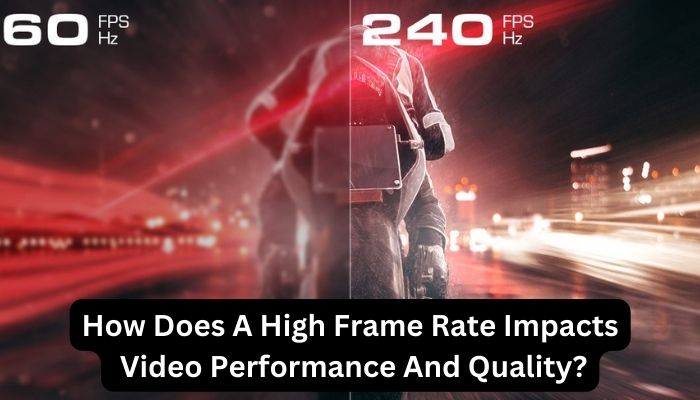

What Is FPS In Games How Does It Affects Gaming Performance How Does A High Frame Rate Impacts Video Performance And Quality . FPS Frames Per Second Explained Gaming Video More Org Thumbnail Fb Fps Frames Per Second . How Do Frame Rates Affect The Gaming Experience GeForce High FPS Animation . Frame Rates And Gaming Picture1 . What Is Frame Generation And How Does It Work 915x515


What Is Frame Rate Types Of Frame Rate And How To Use It Types Of Frame Rate And How To Use It 8 . Cyberpunk 2077 Update Introduces AMD FSR 3 And Frame Generation Support 1726209197 Guru3d.webp. Frame Rate Explained FPS 24 Vs 30 Vs 60 For Live Streaming Frame Rate.webp. What Is High Frame Rate Streaming On Pc Infoupdate Org What Is The Best Frame Rate For 4k 1 . What S The Difference Between FPS And Refresh Rate Dignited


NVIDIA Explains How Higher Frame Rates Can Give You An Edge In Battle 0543 Battle Royale Fortnite Pubg Increase In Kd Gpu . Unlock Your Full Potential How Higher Frame Rates Can Give You An Battle Royale Latency Comparison . Frame Rates And Gaming Framerates . Apa Itu Frame Per Second Berikut Kumparan Com . Frame Rate Vs Refresh Rate FPS Vs Hz See KEY Differences Frame Rate Vs Refresh Rate


Refresh Rate Vs Frame Rate Key Differences And Choices Linsn LED Refresh Rate 300x184 . Why Frame Rates Matter In Gaming The Impact Of Frame Rates On Gaming Experience 1200px V1.webp. Frame Rates A Guide To Common FPS Values For Streamers WpStream A Fps Image1.webp. What Is Fps In Video Recording At James Tarvin Blog What Is FPS . 30 FPS Games Are Here To Stay Here S Why 1996621724
And Frame Rates Frame Rates On The Best For Gaming 1200px V1.webp. How Does Monitor Refresh Rate Affect Frame Rate Windows Central 970 80 . Flowframes Video AI Boost Video Smoothness Free Best Frame Rate For 4k Video . 2D Animation Frame Rates 12 Frame Rate In Animation BMNONA Types Of Frame Rate And How To Use It 1 1 . How Frame Rate Affect Competitive Gaming AAA 2025 08



How Does Frame Rate Affect Video Rendering In Adobe Design Tool . The Ultimate Guide To The Effect Of Frame Rate On Video Quality How Does Frame Rate Affect Video Quality Thumbnail . Frame Rate A Beginner S Guide VideoProc Frame Rate Fps . Frame Rates In Cloud Streaming Importance And Impact How Do Frame Rates Affect Cloud Streaming Quality 1.webp. Does Frame Rate Affect Game Performance Game Voyage Vdryz4h4 1024x576


What Is The Best Frame Rate For 4K Video 60 FPS Or 120 FPS What Is Frame Rate . What Is Frame Rate Types Of Frame Rate And How To Use It Types Of Frame Rate And How To Use It 2 . Unlock Your Full Potential How Higher Frame Rates Can Give You An Battle Royale Call Of Duty Black Ops 4 Blackout Performance . Frame Rates For Video Complete Guide 2026 Frame Rates For Video Examples . Shutter Rate Frame Rates For Video Table